I'm here I'm here!
So the model you have is the older Hyperspot, but I think it should still be the same.
Each light actually produces it's own WiFi signal. You need to connect to that wifi. Normally the only way to connect to that wifi is with the tag that came with the light; each light has a tag with a QR code that will connect you to the light's WiFi.
Don't have the tag with the QR code?
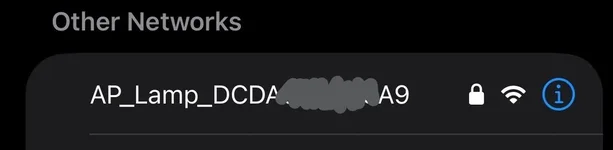
First, find the name of your light in nearby wifi signals.
View attachment 16906
Take a screenshot of the name, and email the screenshot to
support@skylight.blue requesting a new WIFI QR Code.
They'll respond with a QR code to get you into your light's wifi. Then, just use the Skylight Hyperspot app to connect and change your settings!
Let me know if you have questions.
Also, love those swords! Do you know what echinodorus species they are?