Welcome to ScapeCrunch

We are ScapeCrunch, the place where planted aquarium hobbyists come to build relationships and support each other. When you're tired of doom scrolling, you've found your home here.

Help Skylight hyperspot issues

Joined
May 10, 2026
Messages
4
Reaction score
1
Location
Tennessee
Does anyone have any experience at all with the skylight hyperspot light? I’m in the United States and I got one second hand and lightly used but I cannot figure out how to get it connected to the app at all. I don’t see its WiFi in my wifi or anything. It did come with the control attached to the cord but I haven’t figured out how to set that for auto on and off yet. Help.IMG_2499.webp
 
I'm here I'm here!

So the model you have is the older Hyperspot, but I think it should still be the same.

Each light actually produces it's own WiFi signal. You need to connect to that wifi. Normally the only way to connect to that wifi is with the tag that came with the light; each light has a tag with a QR code that will connect you to the light's WiFi.

Don't have the tag with the QR code?

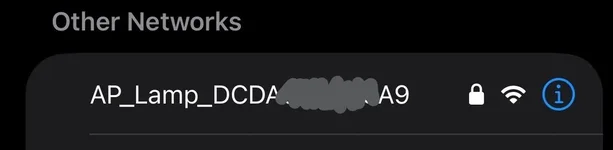
First, find the name of your light in nearby wifi signals. 1778457796260.webp
Take a screenshot of the name, and email the screenshot to support@skylight.blue requesting a new WIFI QR Code.

They'll respond with a QR code to get you into your light's wifi. Then, just use the Skylight Hyperspot app to connect and change your settings!

Let me know if you have questions.


Also, love those swords! Do you know what echinodorus species they are?
 
I'm here I'm here!

So the model you have is the older Hyperspot, but I think it should still be the same.

Each light actually produces it's own WiFi signal. You need to connect to that wifi. Normally the only way to connect to that wifi is with the tag that came with the light; each light has a tag with a QR code that will connect you to the light's WiFi.

Don't have the tag with the QR code?

First, find the name of your light in nearby wifi signals. View attachment 16906
Take a screenshot of the name, and email the screenshot to support@skylight.blue requesting a new WIFI QR Code.

They'll respond with a QR code to get you into your light's wifi. Then, just use the Skylight Hyperspot app to connect and change your settings!

Let me know if you have questions.


Also, love those swords! Do you know what echinodorus species they are?
Thanks so much for the reply! My issue is not finding a wifi signal from the light. It just isn’t there. I will keep trying. As for the echinodorous - I cannot remember to be honest. This is my first time scaping a tank like this and cannot remember each plant i put in there 🥲
 
I'm here I'm here!

So the model you have is the older Hyperspot, but I think it should still be the same.

Each light actually produces it's own WiFi signal. You need to connect to that wifi. Normally the only way to connect to that wifi is with the tag that came with the light; each light has a tag with a QR code that will connect you to the light's WiFi.

Don't have the tag with the QR code?

First, find the name of your light in nearby wifi signals. View attachment 16906
Take a screenshot of the name, and email the screenshot to support@skylight.blue requesting a new WIFI QR Code.

They'll respond with a QR code to get you into your light's wifi. Then, just use the Skylight Hyperspot app to connect and change your settings!

Let me know if you have questions.


Also, love those swords! Do you know what echinodorus species they are?
So, after doing further research, it seems that the controller I have for my light is a two, so it is not Wi-Fi capable. I have to have a three. Unfortunately, I am unable to find one anywhere to purchase in the United States. I guess I have no choice, but to figure out the controller.
 

Top 10 Trending Threads

Back
Top